Claude Code 1M Token Context Window: The Complete Developer Guide for 2026
On March 13, 2026, Anthropic made its 1 million token context window generally available with no long-context surcharge. Here is everything developers need to know: benchmarks, pricing, practical tips, competitor comparisons, and when you should (and should not) use the full 1M context.
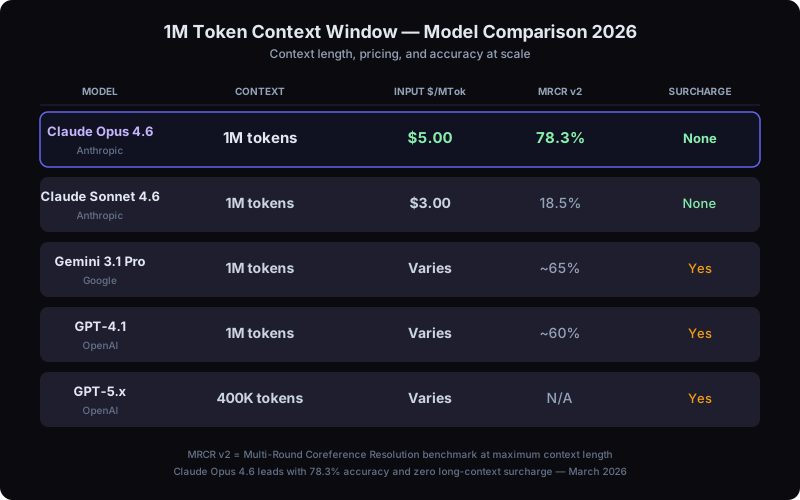
Claude Opus 4.6 leads with highest accuracy and no surcharge at 1M tokens
What Changed: 1M Context Goes GA
Until March 2026, accessing Anthropic's 1 million token context window required beta headers and came with a roughly 2x surcharge on any request exceeding 200K tokens. That changed on March 13, 2026, when Anthropic flipped the switch to general availability for both Claude Opus 4.6 and Claude Sonnet 4.6. No more beta headers. No more long-context pricing premium. Every token from the first to the millionth is billed at the same flat rate.
The 1M context window is now available across every major platform: the Claude Platform API, Amazon Bedrock, Google Vertex AI, and Microsoft Foundry. This means you get the same context capacity regardless of which cloud provider you are building on. For developers using Claude Code (now at 51K+ stars on GitHub), the upgrade is automatic — your CLI sessions now have access to the full million tokens without any configuration changes.
Key takeaway
The removal of the long-context surcharge is the real story here. Previously, a 900K-token request cost roughly 2x the per-token rate compared to a 100K request. Now a 900K-token request is billed at the exact same rate as a 9K request. This fundamentally changes the economics of large-context workflows.
How 1M Context Transforms Developer Workflows
Moving from 200K to 1M tokens is not just a 5x numerical increase — it represents a qualitative shift in what is possible within a single session. After accounting for system prompts, tool definitions, and conversation history, developers get approximately 830K tokens of usable context. That is roughly 2.5 million characters, or the equivalent of a 4,000-page book.
Here is what that means in practice. With 200K tokens, you could load a few dozen files and have a focused conversation about a specific feature. With 1M tokens, you can load an entire monorepo — every source file, configuration, migration script, and test suite — and have Claude reason across all of it simultaneously. Full documentation sets for frameworks like Next.js or Django fit comfortably. You can see both the API layer and the frontend, both the migration and the schema, both the implementation and the tests, all in one session.
This enables what developers are calling the "single-session workflow": research the codebase, plan the architecture, implement the changes, and verify with tests — all without losing context between steps. It is also the foundation of vibe coding, where developers describe what they want in natural language and let AI handle the implementation — a workflow that only becomes practical with a context window large enough to hold the full picture. Previously, each of those phases would require a separate conversation, with inevitable context loss at each handoff. With 1M tokens, the entire cycle fits in one conversation. For teams building agentic AI systems, this is transformative.
The context expansion also extends to multimodal inputs. Each request now supports up to 600 images or PDF pages — a 6x increase from the previous 100-page limit. This makes it practical to have Claude review entire design systems, analyze complete PDF contracts, or process large batches of screenshots for UI testing.
Benchmarks That Actually Matter
Raw context window size is meaningless if the model cannot actually use that context effectively. This is where benchmarks matter — and where Claude Opus 4.6 pulls decisively ahead of the competition.
| Benchmark | Model | Score |
|---|---|---|
| MRCR v2 (1M) | Claude Opus 4.6 | 78.3% |
| MRCR v2 (1M) | Claude Sonnet 4.6 | 18.5% |
| Needle-in-Haystack (1M) | Claude Opus 4.6 | 76% |
| Needle-in-Haystack (1M) | Claude Sonnet 4.6 | 18.5% |
The 78.3% MRCR v2 score is the highest among all frontier models at 1M tokens. MRCR (Multi-Round Coreference Resolution) tests whether a model can track and recall specific facts scattered across an enormous context — exactly the kind of reasoning developers need when Claude is navigating a large codebase. The gap between Opus (78.3%) and Sonnet (18.5%) at the needle-in-haystack test highlights why model selection matters for long-context work.
In real-world validation, Anthropic demonstrated that 16 parallel agent teams produced a 100,000-line Rust C compiler from scratch. Each agent operated within its own 1M context window, managing complex cross-file dependencies across hundreds of source files. This would have been physically impossible at 200K tokens — the compiler source alone exceeded that limit.
Competitor Comparison: 1M Context in 2026
Claude is not the only model offering large context windows. Here is how the major frontier models compare as of March 2026:
| Model | Context | Input $/MTok | MRCR v2 | Surcharge |
|---|---|---|---|---|
| Claude Opus 4.6 | 1M | $5 | 78.3% | None |
| Claude Sonnet 4.6 | 1M | $3 | 18.5% | None |
| Gemini 3.1 Pro | 1M | Varies | ~65% | Yes |
| GPT-4.1 | 1M | Varies | ~60% | Yes |
| GPT-5.x | 400K | Varies | N/A | Yes |
The two standout differentiators for Claude are the benchmark accuracy and the absence of a surcharge. Gemini 3.1 Pro matches the 1M context size but scores roughly 13 points lower on MRCR v2, and Google applies additional pricing for long-context requests. GPT-4.1 offers 1M tokens but trails further on accuracy benchmarks. GPT-5.x caps out at 400K tokens entirely. For developers who need reliable reasoning across large codebases, the combination of highest accuracy and flat-rate pricing makes Opus 4.6 the current leader.
Practical Tips for Using 1M Context Effectively
Having a million tokens available does not mean you should blindly fill the context window. These strategies, drawn from real-world developer workflows and our complete token optimization guide, will help you get the most out of the expanded context.
-
Use CLAUDE.md for persistent project context. Your
CLAUDE.mdfile loads into every session automatically. With 1M tokens, you have room for richer project documentation — but keep it focused on build commands, architecture decisions, and coding conventions. Move specialized instructions into subdirectory CLAUDE.md files so they only load when relevant. -
Use /compact strategically at 50% usage, not 83.5%. Claude Code auto-compacts at 83.5% context usage, but by then you have already spent heavily on tokens that will be summarized away. Trigger
/compactmanually around the 50% mark with custom instructions about what to preserve. This gives the compaction algorithm more room to produce a high-quality summary. - Leverage subagents for isolated research. When Claude needs to search a large codebase, run tests, or process verbose logs, delegate those tasks to subagents. The subagent works in its own isolated context and returns only a concise summary, keeping your main context clean. This is especially valuable with multi-agent orchestration with Paperclip.
-
Route tasks to the right model. Not every task requires Opus-level reasoning. Use
/modelto switch to Sonnet for straightforward coding tasks and reserve Opus for complex architecture decisions, multi-file refactors, and long-context reasoning where the benchmark gap matters. -
Use session-start hooks to pre-load context. Configure hooks in your
.claude/directory to automatically load critical project files, recent git history, or CI status at the start of every session. This ensures Claude has the right context from the first message without you having to manually provide it each time. - Know that tool results over 50K tokens are auto-persisted to disk. When Claude reads a large file or runs a command that produces massive output, results exceeding 50K tokens are automatically saved to disk rather than kept in the context window. Claude can re-read them when needed, which keeps your active context lean.
Cost Reality: What 1M Tokens Actually Costs
Pricing breakdown
Claude Opus 4.6: $5 per million input tokens, $25 per million output tokens.
Claude Sonnet 4.6: $3 per million input tokens, $15 per million output tokens.
A 900K-token request is billed at the exact same rate as a 9K-token request. No tiers, no surcharges, no hidden multipliers.
Let us do the math on a realistic scenario. If you fill 830K usable tokens of context with Opus 4.6, the input cost for that single request is approximately $4.15. That sounds significant in isolation, but consider what it replaces: manually splitting work across multiple smaller sessions, losing context at each boundary, and spending time re-explaining the project to Claude over and over.
The real cost saver is prompt caching. When you use the Claude API with caching enabled, repeated context (system prompts, loaded files, conversation history) is cached and charged at just 10% of the base input rate. This means that in a multi-turn conversation where 700K tokens of context remain stable, you are paying full price only on the first request. Subsequent requests hit the cache and cost 90% less for the cached portion. Combined with the flat-rate pricing, this makes sustained long-context work surprisingly affordable.
For teams looking to optimize further, the Model Context Protocol enables structured context management that maximizes cache hit rates. And for non-urgent workloads, the Batch API provides an additional 50% discount that stacks with caching.
When NOT to Use the Full 1M Context
Honesty matters more than hype. The 1M context window is powerful, but it is not always the right tool. Here are the situations where you should intentionally use less context:
Diminishing returns on simple tasks. If you are fixing a typo in a single file, loading your entire monorepo into context does not help — it just costs more. Match the context size to the task complexity. A focused 50K-token session is faster, cheaper, and often produces better results for targeted edits than a bloated 800K-token session.
Cost awareness at scale. At $5 per million input tokens for Opus, filling 830K of usable context costs $4.15 per request. If your workflow involves dozens of large-context requests per day, that adds up. Be intentional about what you load. Use .claudeignore to exclude irrelevant files, and use /clear between unrelated tasks. Our token optimization guide covers strategies that can cut costs by 70% or more.
Effective capacity is not 100% of advertised limits. This applies across all models, not just Claude. The effective usable capacity is roughly 60-70% of the advertised context window. System prompts, tool definitions, conversation history, and model overhead consume a significant chunk. For a 1M window, plan for about 600K-700K tokens of actual content. For Gemini's 1M and GPT-4.1's 1M, the same reduction applies. Do not assume you can load exactly 1 million tokens of your own content into any model.
Accuracy degrades with distance. While Opus 4.6 leads all models on long-context benchmarks, recall accuracy still decreases the further information is from the model's attention window. For critical lookups — API keys, specific configuration values, exact function signatures — place the most important context closer to the end of the prompt where attention is strongest.
Real-World Architecture: How Teams Are Using 1M Context
The most effective pattern emerging in the developer community is what teams call the "context pyramid." At the base, you have your CLAUDE.md and project configuration, loaded automatically and cached aggressively. In the middle layer, you have the specific files and documentation relevant to the current task, loaded on demand. At the top, you have the live conversation — questions, answers, code edits, and test results.
This pyramid structure maximizes cache hits (the base rarely changes) while keeping the active working context focused. Teams using agent teams take this further — each agent in a team gets its own 1M context window, focused on a specific area of the codebase. A frontend agent, a backend agent, and an infrastructure agent can each hold their entire domain in context while a coordinator agent manages the overall plan.
For enterprise teams, the 1M context window combined with AI development services enables workflows that were previously impractical: full codebase migrations, comprehensive security audits across hundreds of files, and end-to-end feature development from specification to deployment — all within a single Claude session.
Getting Started: Your First 1M-Token Session
Ready to put the 1M context window to work? Here is a practical starting point. Install or update Claude Code from the official repository. Open your project directory and use /model to select claude-opus-4-6. Then give Claude a task that benefits from broad context — a cross-cutting refactor, a full codebase review, or architecting a new feature that touches multiple layers. Watch how the model connects patterns across files that would have been impossible to fit in a single 200K session.
Start with Shift+Tab to enter plan mode. Let Claude explore your entire project, build a mental model, and propose an approach before writing any code. This "explore then execute" pattern is where 1M context truly shines — Claude can read hundreds of files during the exploration phase and retain all of that understanding when it starts implementing.
Monitor your token usage with /cost as you work. This gives you a real-time sense of how quickly you are consuming context and when it might be time to /compact or start a new session. Over time, you will develop an intuition for which tasks justify the full 1M context and which are better served by focused, smaller sessions.
Start Building With 1M Context Today
The 1M token context window at flat-rate pricing changes the calculus for AI-assisted development. Whether you are an individual developer looking to tackle larger refactors or an enterprise team building complex agentic systems, the expanded context opens workflows that simply were not possible before. At Codeloop, we help teams architect AI development pipelines that make the most of these capabilities — from Claude Code setup and optimization to full multi-agent orchestration and custom tooling.
Talk to Us About AI DevelopmentFrequently Asked Questions
What is the 1M token context window in Claude Code? +
The 1M (one million) token context window is the amount of information Claude Opus 4.6 and Sonnet 4.6 can process in a single session. It became generally available on March 13, 2026 with no long-context surcharge. One million tokens equals roughly 2.5 million characters or a 4,000-page book, allowing Claude to hold an entire monorepo in memory at once.
What are the benefits of using the full 1M context? +
The 1M context enables single-session workflows where you can research, plan, implement, and test without losing context between steps. You can load entire codebases, full documentation sets, and complete test suites simultaneously. Claude can reason across all files at once, making cross-cutting refactors, codebase migrations, and full security audits practical in a single conversation.
When should I use the full 1M context vs a smaller window? +
Use the full 1M context for complex tasks that span multiple files: large refactors, architecture reviews, cross-layer feature development, and codebase migrations. For simple, focused tasks like fixing a typo or editing a single file, a smaller context is faster, cheaper, and often produces better results. Match context size to task complexity.
How much does using the 1M context window cost? +
Claude Opus 4.6 costs $5 per million input tokens and $25 per million output tokens, with no long-context surcharge. A full 830K usable token request costs approximately $4.15 for input. Prompt caching reduces repeated context to 10% of the base rate, making sustained long-context work significantly more affordable. The Batch API offers an additional 50% discount for non-urgent workloads.
What are the best practices for using 1M context effectively? +
Key best practices include: use CLAUDE.md for persistent project context, trigger /compact manually at 50% usage rather than waiting for auto-compaction at 83.5%, delegate verbose research tasks to subagents, use /model to switch to Sonnet for simple tasks, configure .claudeignore to exclude irrelevant files, and place the most important context near the end of prompts where model attention is strongest.