How to Build AI Agent Teams with Claude Code: Multi-Agent Development Guide
One Claude Code session is powerful. A coordinated team of Claude Code agents — each working in parallel on separate parts of your codebase — is a different category entirely. Here is everything you need to know about agent teams: how they work, when to use them, what they cost, and how to get the most out of them.
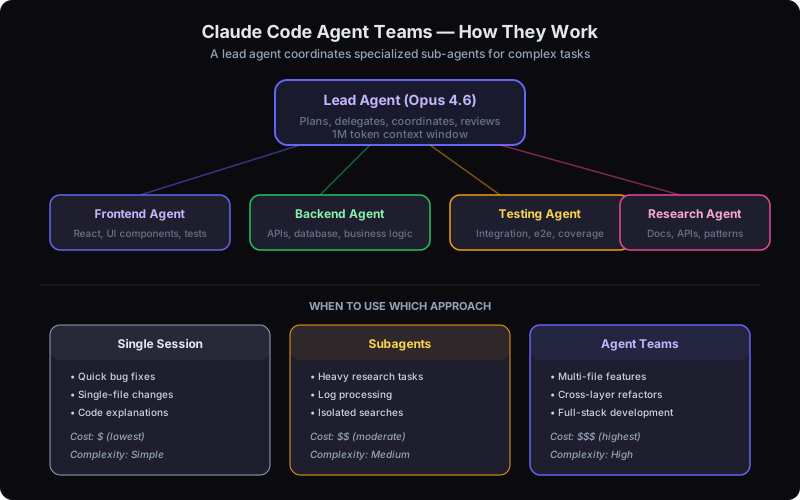
Agent teams: a lead coordinates specialists for complex multi-file development
What Are Agent Teams?
Agent teams are a feature in Claude Code that allows multiple Claude Code sessions to work on the same project simultaneously, coordinated by a single lead agent. Instead of one agent tackling every part of a complex task sequentially, the lead agent breaks the work into independent pieces and delegates each piece to a specialized sub-agent running in its own session.
Launched on February 5, 2026 as an experimental feature by Anthropic, agent teams represent a fundamental shift in how developers interact with AI coding assistants. Rather than a single conversation thread doing everything, you get a distributed system where the lead agent (running Opus 4.6) orchestrates multiple sub-agents that each operate in their own context window and their own git worktree.
The key architectural details:
- The lead agent runs on Opus 4.6 and holds the big-picture understanding of the entire task
- Each sub-agent gets its own isolated context window and its own git worktree — no stepping on each other's files
- Sub-agents report summaries back to the lead, not raw output — keeping the lead's context clean
- Sub-agents run in true parallel — not sequential, not queued, but simultaneously
If you have been following the agentic AI revolution, agent teams are the natural next step: moving from powerful individual agents to coordinated multi-agent systems that can tackle truly large-scale engineering work.
Why 1M Context Makes Agent Teams Viable
Agent teams would not work without a massive context window on the lead agent. The lead needs to understand the full project architecture, track what each sub-agent is doing, reconcile their outputs, and make decisions about merging — all without losing the thread. This is where the 1M token context window becomes essential rather than just a nice-to-have.
With 1M tokens, the lead agent can hold an entire codebase map in memory while simultaneously tracking summaries from five, ten, or even fifteen sub-agents. Before the context expansion, lead agents would hit compaction limits mid-task, losing critical information about what was already delegated and what still needed coordination. Now the lead maintains full project understanding from start to finish.
Why summaries matter
Sub-agents do not dump their entire conversation history back to the lead. They return concise summaries of what they did, what changed, and any issues they encountered. This design means the lead's context grows slowly even as the total work across all agents grows exponentially. It is the difference between a manager who reads every email and one who gets executive summaries.
Step-by-Step: Setting Up Agent Teams
Getting started with agent teams requires a few configuration steps. Since the feature is still experimental, you need to opt in explicitly.
1. Enable Experimental Features
Open your Claude Code settings and enable the agent teams experiment. You can do this from within a Claude Code session:
Claude Code Settings
{
  "experiments": {
    "agentTeams": true
  },
  "model": "claude-opus-4-6",
  "preferredModels": {
    "lead": "claude-opus-4-6",
    "subagent": "claude-sonnet-4-6"
  }
}
Alternatively, run /config inside Claude Code and toggle the agent teams experiment from the interactive menu.
2. Select Opus 4.6 as the Lead Model
Agent teams require Opus 4.6 as the lead model — Sonnet and Haiku cannot serve as leads. Use /model claude-opus-4-6 to switch if you are not already on Opus. The sub-agents can run on any model, and using Sonnet for sub-agents is a key strategy for reducing token costs.
3. Describe Your Task
You do not manually spawn agents. Describe a sufficiently complex task, and Claude will automatically decide whether to use agent teams. The key is describing tasks that naturally decompose into parallel work.
Example prompt that triggers agent teams
"Refactor the authentication system: update the backend API to use JWT refresh tokens in src/api/auth/, update the React frontend login flow in src/components/auth/, add integration tests for both layers in tests/integration/, and update the API documentation in docs/. Make sure all existing tests still pass."
This prompt naturally splits into four independent workstreams — backend, frontend, tests, and docs. Claude's lead agent recognizes this and spawns sub-agents for each. Each sub-agent gets its own git worktree so their file changes do not conflict during development.
4. Monitor and Review
As sub-agents work, the lead agent tracks their progress and reports updates to you. When all sub-agents complete, the lead merges their worktrees and presents the consolidated result. Use /cost to monitor token consumption in real time — agent teams burn through tokens faster than single sessions, so keeping an eye on costs is important.
Real Use Cases for Agent Teams
Agent teams shine on tasks that are too large for a single session but have clearly separable components. Here are the three patterns where they deliver the most value:
Parallel Debugging
A production bug could be in the frontend, the backend API, or the database layer. Instead of investigating each layer sequentially — which can take hours — the lead agent spawns three sub-agents that investigate simultaneously. The frontend agent traces the UI state. The backend agent inspects API logs and request handlers. The database agent analyzes queries and schema. All three report findings back, and the lead agent cross-references them to pinpoint the root cause in a fraction of the time.
Cross-Layer Feature Development
Building a full-stack feature — say, a user notification system — involves API endpoints, database migrations, frontend components, and tests. The lead agent designs the overall architecture, then delegates each layer to a specialized sub-agent. The API agent builds the endpoints, the UI agent creates the notification panel, and a test agent writes integration tests against mocked versions of both. When they converge, the lead resolves any interface mismatches and merges the work.
Research Sprints
When exploring how to approach a complex migration or evaluating multiple libraries, the lead agent can dispatch research sub-agents to explore different options concurrently. One agent reads the documentation for library A, another benchmarks library B, and a third reviews community reports for library C. The lead aggregates the findings into a single recommendation.
The 100K-line Rust C compiler example
The most ambitious public use of agent teams so far was building a 100,000-line Rust C compiler from scratch. The project used 16 agents across approximately 2,000 sessions. Each agent specialized in a different compiler component — lexer, parser, type checker, code generator, optimizer — while the lead agent coordinated integration testing and architectural consistency. It demonstrated what is possible when you push the boundaries, though the costs were significant (more on that below).
Agent Teams vs Subagents vs Single Sessions
Claude Code offers three modes of operation, and choosing the right one matters. Not every task needs agent teams — in fact, most tasks are better served by a single session or subagents.
| Aspect | Single Session | Subagents | Agent Teams |
|---|---|---|---|
| Best for | Quick fixes, single files | Heavy research, log processing | Multi-file features, full-stack work |
| Context | Shared, 1M max | Isolated, reports summary | Each gets own context + worktree |
| Cost | $ lowest | $$ moderate | $$$ highest |
| Parallelism | None | Limited | Full parallel execution |
| Git isolation | Same branch | Same branch | Separate worktrees |
The rule of thumb: Start with a single session. If you find yourself wishing Claude could work on two things at once, try subagents. If you need multiple agents making coordinated changes across different parts of the codebase simultaneously, that is when agent teams earn their cost.
Cost Reality and Optimization
Let us be direct about costs: agent teams are expensive. Each sub-agent consumes its own context window worth of tokens, and the lead agent's usage grows as it coordinates. Costs multiply, not add.
Real-world cost reference
The 100,000-line Rust C compiler project that used 16 agents across ~2,000 sessions cost approximately $20,000 in API tokens. That is an extreme example, but it illustrates the scale of costs when agent teams run on complex, long-running tasks. Most production uses will be far cheaper — a typical full-stack feature might cost $5-50 depending on complexity and how many agents are involved.
Here are proven strategies for keeping agent team costs under control:
- Use Sonnet sub-agents where possible — Opus costs 67% more per token than Sonnet, and most sub-agent tasks do not require Opus-level reasoning. Only the lead needs Opus.
- Define clear task boundaries — Vague delegation causes sub-agents to explore unnecessarily. Give each agent a specific scope: files to modify, acceptance criteria, and constraints.
- Use /compact in the lead session — The lead accumulates context as sub-agents report back. Periodic compaction keeps its context lean and prevents unnecessary re-reading of old summaries.
-
Set up .claudeignore — Every agent reads your project structure. A well-configured
.claudeignorereduces per-agent context consumption by 50-70%. Read our full token optimization guide for more. - Monitor with /cost — Check costs regularly during agent team runs. If a sub-agent is consuming more than expected, the lead can intervene early.
For teams managing budgets across multiple developers and projects, tools like Paperclip for managing agent organizations can add budget enforcement and cost visibility on top of Claude Code's built-in tracking. You can also see how orchestration tools compare when deciding on your cost management stack.
Best Practices for Agent Teams
After working with agent teams across multiple projects, here is the checklist we recommend:
- Give clear, bounded tasks to each agent — Specify which files, which functions, and what the expected outcome looks like. Ambiguity leads to wasted tokens and overlapping work.
- Use worktrees for isolation — Agent teams create separate git worktrees automatically. This prevents agents from overwriting each other's changes. Do not fight the system by trying to use a single branch.
- Review agent work before merging — The lead agent merges sub-agent worktrees, but you should review the consolidated diff before committing. Agent teams are powerful, but they can introduce subtle inconsistencies across layers.
- Monitor costs with /cost — Agent teams can rack up tokens fast. Check costs after each major delegation cycle, not just at the end.
- Start small — two to three agents — before scaling up — Get a feel for how delegation works, how summaries flow back, and how merging behaves before launching a dozen agents. You can always add more.
-
Use plan mode first — Press
Shift+Tabto enter plan mode before describing a complex task. Let the lead agent design the agent team structure, review the plan, then approve execution. This prevents wasted cycles from a bad initial decomposition.
The biggest mistake we see is over-decomposition: splitting a task into too many sub-agents when three or four would have been sufficient. Each additional agent adds coordination overhead and cost. The lead agent has to track more summaries, reconcile more worktrees, and handle more potential merge conflicts. Fewer, well-scoped agents almost always outperform many narrow agents.
Limitations and Gotchas
Honest assessment
Agent teams are powerful but still experimental. Here is what to watch out for before relying on them for critical work.
- Still experimental — not recommended for production CI/CD — Agent teams can produce inconsistent results, especially on tightly coupled codebases. Do not integrate them into automated deployment pipelines yet. Use them for development, not as a CI step.
- You cannot manually control which agents spawn — The lead agent decides how to decompose the task and how many sub-agents to create. You can influence this by how you structure your prompt, but you do not get direct control over the team composition. Sometimes Claude spawns too many agents for a simple task, or too few for a complex one.
- Merge conflicts between agents are possible — Even with separate worktrees, two agents can make conceptually conflicting changes — for example, one agent changes an API signature while another agent writes code against the old signature. The lead agent tries to resolve these, but manual intervention is sometimes needed.
- High cost for exploratory tasks — If the task is not well-defined, agents may spend significant tokens exploring dead ends. Agent teams work best when the task can be clearly decomposed upfront. Open-ended exploration is better handled by a single session with subagents.
These limitations are actively being addressed by the Anthropic team. The feature has improved significantly since its February launch, and each Claude Code update brings better coordination logic, smarter decomposition, and reduced merge conflicts. But for now, treat agent teams as a power tool that requires supervision, not an autonomous build system.
Agent Teams in the Broader Ecosystem
Agent teams do not exist in isolation. They integrate with the broader Claude Code ecosystem and the growing landscape of multi-agent tools. Sub-agents have access to any MCP protocol servers you have configured, which means they can pull data from databases, query APIs, and interact with external services just like a single Claude Code session.
If you are managing larger-scale agent operations across multiple projects or teams, orchestration platforms like Paperclip can add organizational structure on top of Claude Code's agent teams — think budget enforcement, approval gates, and audit trails. For a deeper dive into how these tools complement each other, see our comparison of how orchestration tools compare.
The trajectory is clear: AI development is moving from individual agents to coordinated agent systems. This shift is closely tied to the rise of vibe coding, where developers describe intent and let AI handle implementation — agent teams take that paradigm to its logical extreme. Whether you use Claude Code's built-in agent teams, external orchestration platforms, or a combination, the ability to manage multiple AI workers simultaneously is becoming a core engineering skill. For a deeper look at how different AI agent frameworks like LangChain, CrewAI, and AutoGen compare, see our 2026 framework comparison. Our AI agent development team has been helping companies navigate this transition since early 2025.
Ready to Build Your First Agent Team?
Agent teams are one of the most powerful features in modern AI development tooling, but getting the architecture right — task decomposition, cost management, merge strategies, and monitoring — takes practice. At Codeloop, we help teams set up efficient multi-agent workflows that deliver results without burning through budgets. Whether you need help configuring your first agent team or designing a full-scale multi-agent development pipeline, we have done it before and can get you there faster.
Talk to Us About Agent TeamsFrequently Asked Questions
What are Claude Code agent teams? +
Claude Code agent teams are a feature that allows multiple Claude Code sessions to work on the same project simultaneously, coordinated by a single lead agent. The lead agent (running Opus 4.6) breaks complex tasks into independent pieces and delegates each to a specialized sub-agent running in its own session and git worktree.
How does multi-agent coordination work in Claude Code? +
The lead agent analyzes the task, identifies parallelizable work, and spawns sub-agents that each operate in their own context window and git worktree. Each sub-agent works independently on its assigned piece — such as frontend, backend, or testing — and reports results back to the lead agent, which coordinates merging and resolves any conflicts.
What are the best use cases for agent teams? +
Agent teams are ideal for large cross-cutting tasks that touch multiple parts of a codebase simultaneously: full-stack feature development, large-scale refactors, parallel debugging across layers, codebase migrations, and comprehensive test suite generation. They are less suited for small, focused tasks where a single session is sufficient.
How much do Claude Code agent teams cost? +
Each sub-agent in a team consumes tokens independently, so costs scale with the number of agents and the complexity of their tasks. The lead agent uses Opus 4.6 ($5/MTok input, $25/MTok output), and sub-agents use the same pricing. To manage costs, keep teams small (3-5 agents), use clear task scoping, and leverage prompt caching where possible.
How do I get started with agent teams? +
Install or update Claude Code from the official repository, then give it a task that naturally decomposes into parallel work. Claude Code will automatically suggest using agent teams when the task benefits from parallelization. Start with a simple two or three agent team to understand the workflow before scaling up to larger teams.