What Is Paperclip? The Open-Source AI Agent Orchestration Platform Explained
Running one AI agent is easy. Running twenty that depend on each other, share budgets, and report to different managers? That requires orchestration. Paperclip is the open-source platform designed to make multi-agent coordination feel as natural as running a company.
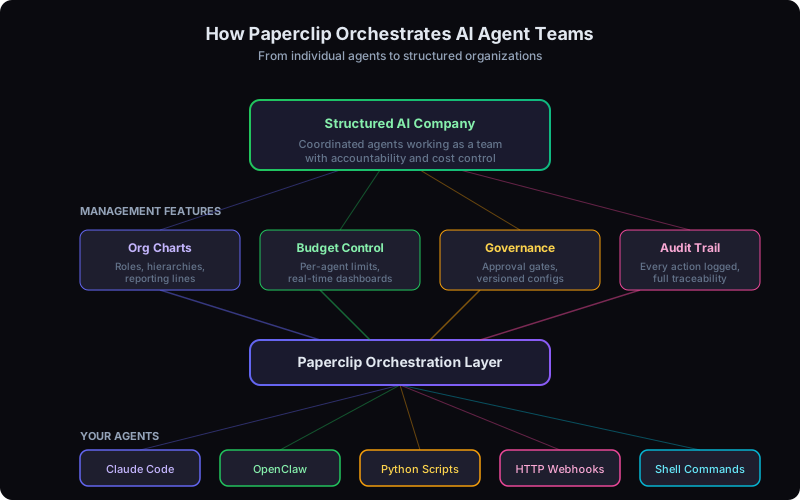
How Paperclip turns individual agents into a coordinated organization
What Is Paperclip?
Paperclip is an open-source AI agent orchestration platform built on a Node.js server and React UI. It lets you manage teams of AI agents as structured organizations — complete with org charts, budgets, governance rules, and audit trails. Instead of treating agents as isolated chatbots, Paperclip treats them as employees inside a company you design.
The project is fully open-source and available on GitHub, with a hosted dashboard at paperclip.ing. If you have been following the rapid evolution of agentic AI in 2026, Paperclip represents the next logical step: moving from individual agent capability to organizational agent management.
At Codeloop, we have been deploying multi-agent systems for clients since early 2025. Paperclip addresses the exact gap we kept hitting — the need for a centralized layer that coordinates agents, enforces spending limits, and maintains a clear chain of accountability. After testing it across several internal projects, we can say it delivers on its core promise.
How Paperclip Works
The core idea is straightforward: you bring the agents, Paperclip brings the structure. Your agents can be anything — Claude Code agent teams, OpenClaw bots, Python scripts, shell commands, or HTTP webhooks. Paperclip does not care what powers the agent. It cares about what the agent is responsible for, who it reports to, and how much it is allowed to spend.
On the surface, the dashboard looks like a project management tool — tasks, statuses, timelines. But underneath, Paperclip maintains a full organizational graph: reporting lines, role definitions, budget allocations per agent, and governance policies that control what each agent can and cannot do autonomously.
Here is how the workflow typically looks:
Create departments, roles, and reporting hierarchies. A content company might have a CEO agent, an editor agent, and five writer agents.
Connect any agent type — Claude Code, OpenClaw, custom scripts, or HTTP endpoints. Assign each agent to a role in the org chart.
Set objectives for each agent or team. Attach per-agent budgets and per-tool-call pricing limits to prevent runaway costs.
Track work, review audit logs, approve high-stakes decisions, and adjust budgets — all from the Paperclip dashboard.
Key Features of Paperclip
What separates Paperclip from a basic task runner or simple agent launcher is the depth of its organizational features. Here is what you get out of the box:
- Organizational Structure — Define hierarchies, roles, and reporting lines. Agents know who they report to and who reports to them. A manager agent can delegate tasks to subordinate agents and aggregate their outputs.
- Budget Management — Set per-agent budgets and per-tool-call pricing. Paperclip tracks spending in real time and halts agents that exceed their allocation. If you have struggled with keeping token costs under control, this feature alone is worth the setup.
- Audit Trail — Every instruction, every response, every tool call is recorded. You get a complete, searchable history of what each agent did, why it did it, and what it cost. This is critical for compliance and debugging.
- Governance — Configure approval gates for high-stakes operations. Certain actions can require human sign-off or manager-agent approval before proceeding. All configuration is versioned with full rollback support.
- Multi-Company Support — One Paperclip installation can manage unlimited companies. Each company gets its own org chart, budget pool, and governance rules. Ideal for agencies or consultancies managing AI operations for multiple clients.
Getting Started with Paperclip
Paperclip ships with a one-command onboarding process. If you have Node.js installed, getting started takes under five minutes:
npx paperclipai onboard --yes This command scaffolds a default company, creates your first org chart, and opens the React dashboard in your browser. From there, you can register agents, define roles, and assign your first set of goals.
The onboarding wizard walks you through connecting your first agent. If you are already running OpenClaw bots, you can point your existing OpenClaw installation at Paperclip's coordination layer. For agents that communicate via the Model Context Protocol, Paperclip supports MCP-compatible endpoints natively.
Pro tip from our deployments
Start with two or three agents before scaling up. We found that teams who define their org structure carefully at the start — even if it is just a manager and two workers — avoid the "spaghetti agent" problem where nobody knows which agent is responsible for what.
Paperclip vs Individual Agents
The best way to understand Paperclip's role is this analogy: if OpenClaw is an employee, Paperclip is the entire company.
An individual agent framework like OpenClaw (or its open-source codebase on GitHub) excels at making a single agent powerful. It connects to LLMs, messaging platforms, and tools. It handles context, memory, and tool execution for one agent at a time.
Paperclip operates at a higher layer. It does not replace your agents — it organizes them. Here is what each layer handles:
| Concern | Individual Agent (e.g., OpenClaw) | Paperclip |
|---|---|---|
| Task execution | Yes | Delegates to agents |
| LLM connection | Yes | Uses agent's own LLM |
| Org structure | No | Full hierarchy support |
| Budget tracking | Basic | Per-agent, per-call |
| Governance | No | Approval gates, rollback |
| Multi-agent coordination | Limited | Core purpose |
You do not choose between Paperclip and an agent framework. You use both. Paperclip sits on top and manages whatever agents you already have. If you are evaluating which agent framework to use underneath Paperclip, our 2026 comparison of LangChain, CrewAI, AutoGen, and LangGraph can help you decide.
Real Use Cases for Paperclip
Based on our experience deploying agent systems — and the patterns we have seen across real-world AI agent case studies — here are the three use cases where Paperclip delivers the most value:
Zero-Human Content Companies
A CEO agent sets weekly content goals. An editor agent breaks them into assignments. Writer agents produce drafts. A QA agent reviews for quality and SEO. A publisher agent handles scheduling and distribution. Paperclip manages the entire pipeline — budgets, deadlines, approvals, and output tracking. No human touches the content unless governance rules flag something for review.
Multi-Agent Development Teams
A lead developer agent triages issues from GitHub. Specialized coding agents pick up tasks based on their assigned domain (frontend, backend, infrastructure). A code review agent checks PRs against style guidelines and test coverage. A DevOps agent handles deployment pipelines. Paperclip tracks who is working on what, prevents agents from stepping on each other's changes, and enforces budget limits on API calls.
Automated Customer Operations
A routing agent classifies incoming support tickets. Tier-1 agents handle common questions using a knowledge base. Tier-2 agents escalate complex issues to specialized agents (billing, technical, account management). A supervisor agent monitors response quality and customer satisfaction scores. Governance rules ensure refund approvals above a threshold require human sign-off.
When Should You Use Paperclip?
Not every project needs an orchestration layer. If you are running a single agent that answers questions or performs one type of task, you probably do not need Paperclip — just use OpenClaw or Claude Code directly.
Paperclip becomes essential when you need coordination, not just capability. Specifically, you should consider it when:
- You are running three or more agents that need to share context or hand off tasks to each other
- You need budget controls to prevent a runaway agent from burning through your API credits overnight
- You require audit trails for compliance, debugging, or client reporting
- You want governance gates so that certain decisions still require human approval
- You are building toward a zero-human or low-human operation where agents handle end-to-end workflows
The inflection point we have observed at Codeloop is around the three-agent mark. Below that, a simple script or cron job can handle coordination. Above that, you start losing track of who did what, costs spiral, and debugging becomes painful. Paperclip solves this cleanly.
Architecture at a Glance
For the technically curious, Paperclip's architecture is deliberately simple:
- Node.js Server — Handles the orchestration logic, agent registry, budget enforcement, and governance rules. Exposes a REST API for programmatic control.
- React Dashboard — The visual interface for managing companies, org charts, agents, tasks, and budgets. Runs in the browser, connects to the server via API.
- Agent Adapters — Lightweight connectors that let Paperclip communicate with any agent type. Built-in adapters exist for shell commands, HTTP webhooks, and common agent frameworks.
- Persistent Storage — All org definitions, task histories, audit logs, and configuration versions are stored locally. No external database required for the default setup.
The system is stateless at the orchestration layer — agents maintain their own context and memory. Paperclip only tracks the organizational metadata: who is assigned to what, budget consumption, task status, and approval state.
Limitations to Know About
Paperclip is still a young project, and transparency matters. Here are the current limitations we have encountered:
- Early-stage ecosystem — The community and plugin ecosystem are still forming. Expect to write custom adapters for niche agent types.
- No built-in LLM — Paperclip is an orchestrator, not an agent runtime. You need to bring your own agents and LLM keys.
- Learning curve for governance — The approval gate and versioned config system is powerful but takes time to configure correctly for complex workflows.
None of these are dealbreakers, but they are worth knowing before you commit to a full deployment. For most multi-agent setups, the value far outweighs the friction.
Need Help Building a Multi-Agent System?
At Codeloop, we specialize in designing, deploying, and managing AI agent systems — from single-agent automation to full multi-agent orchestration with Paperclip. Whether you need help choosing the right architecture, configuring governance rules, or integrating agents into your existing workflows, our AI agent services team has done it before.
We handle the technical complexity so you can focus on what your agents should accomplish.
Book a Free ConsultationFrequently Asked Questions
What is AI agent orchestration? +
AI agent orchestration is the coordination of multiple AI agents working together as a structured organization. Instead of running isolated agents, orchestration provides org charts, reporting hierarchies, budget controls, governance policies, and audit trails so that agents collaborate effectively, stay within spending limits, and maintain accountability.
What types of agents can Paperclip orchestrate? +
Paperclip is agent-agnostic. It can orchestrate Claude Code agents, OpenClaw bots, Python scripts, shell commands, HTTP webhooks, or any other agent type. Built-in adapters handle common frameworks, and you can write custom adapters for niche agent types. Paperclip does not care what powers the agent — it manages organizational structure, budgets, and governance.
How do multi-agent workflows work in Paperclip? +
You define an organizational hierarchy with roles and reporting lines. Manager agents can delegate tasks to subordinate agents and aggregate their outputs. Paperclip tracks task assignments, monitors completion status, enforces per-agent budgets, and applies governance rules such as requiring human approval for high-stakes decisions. The entire workflow is recorded in a searchable audit trail.
Is Paperclip free to use? +
Yes, Paperclip is fully open-source and free to self-host. The project is available on GitHub and includes a hosted dashboard at paperclip.ing. Your costs are limited to the LLM API usage of the agents you orchestrate and any infrastructure you choose to run Paperclip on.
How do I get started with Paperclip? +
Run npx paperclipai onboard --yes to scaffold a default company, create your first org chart, and open the React dashboard. From there, register your agents, define roles, and assign goals. Start with two or three agents before scaling up to avoid the "spaghetti agent" problem where responsibilities become unclear.