How to Save Tokens in Claude Code, OpenClaw, and AI Coding Tools: The Complete 2026 Guide
The average Claude Code developer spends $6 per day on tokens — but the top 10% spend under $2. Here is every strategy that separates the two groups, from quick wins to advanced techniques across Claude Code, the Claude API, OpenClaw, Paperclip, and other wrapper platforms.
Why Token Optimization Matters More Than Ever
AI coding assistants are reshaping software development. Claude Code, Cursor, Windsurf, Cline, and OpenClaw have become everyday tools for hundreds of thousands of developers. But here is the uncomfortable truth: most developers burn through tokens without realizing where the waste happens.
Token costs add up fast — especially when you are using premium models like Claude Opus. A single day of unoptimized usage can cost more than your entire monthly subscription if you are not careful. This is especially relevant as vibe coding becomes the dominant development paradigm — the more you rely on AI to write code from natural language prompts, the more tokens you consume. The good news? With the right strategies, you can cut your token consumption by 70% or more without sacrificing output quality.
Key insight
According to Anthropic's own data, 99.4% of Claude Code tokens are input tokens — the model reads 166 times more than it writes. This means the single biggest lever for saving money is reducing what Claude reads, not what it generates.
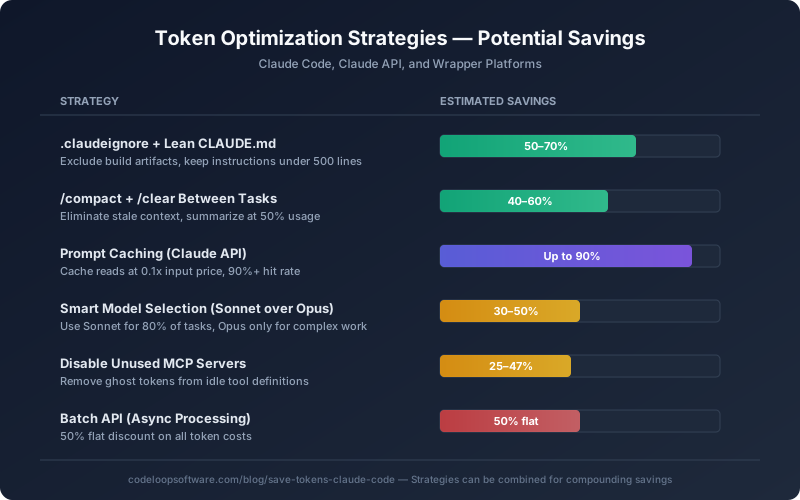
Token savings by strategy — most can be combined for compounding results
Part 1: Claude Code Token Optimization
Claude Code is Anthropic's official CLI tool with a 1-million-token context window. That is powerful, but it also means there is plenty of room for waste. Here are the strategies that deliver the biggest savings.
1. Set Up .claudeignore Immediately
Just like .gitignore tells Git which files to skip, .claudeignore tells Claude Code which files to never read. Without it, Claude will happily scan your node_modules, build artifacts, lock files, and generated code — burning thousands of tokens on content that is irrelevant to your task.
Recommended .claudeignore
node_modules/
dist/
build/
.next/
*.lock
package-lock.json
yarn.lock
*.min.js
*.map
coverage/
.git/
*.log
__pycache__/
.env*
This single file can reduce your token usage by 50-70% for typical JavaScript or Python projects. Create it in your project root and add it on day one.
2. Keep CLAUDE.md Lean
Your CLAUDE.md file loads into every single conversation. Every token in that file is consumed every session. If your CLAUDE.md is 2,000 lines of detailed instructions, you are spending thousands of tokens before you even type your first message.
- Keep root CLAUDE.md under 500 lines (ideally under 200 for aggressive optimization)
- Move specialized instructions into subdirectory CLAUDE.md files that only load when relevant
-
Use custom slash commands in
.claude/commands/for on-demand instructions - Include only build commands, code patterns, and team conventions — skip anything derivable from code
3. Master /compact and /clear
These two slash commands are the most impactful token-saving tools in Claude Code, yet most developers underuse them.
Use /clear every time you start a new task. Stale context from previous work wastes tokens on every subsequent message. Use /rename first if you want to resume later.
Trigger /compact manually at around 50% context usage — do not wait for auto-compaction at 83.5%. You can also pass custom instructions: /compact Focus on the API changes and test results to tell Claude what to preserve.
A good rhythm: compact every 30-40 messages, and clear between unrelated tasks. This alone saves 40-60% of accumulated context tokens.
4. Choose the Right Model for Each Task
Not every task needs Claude Opus. Here is a practical model selection guide that can cut your costs by 30-50%:
| Model | Input / Output (per MTok) | Best For |
|---|---|---|
| Haiku 4.5 | $1 / $5 | Simple edits, file searches, subagent tasks |
| Sonnet 4.6 | $3 / $15 | 80% of coding tasks — features, bugs, refactoring |
| Opus 4.6 | $5 / $25 | Complex architecture, multi-file reasoning |
| opusplan | Mixed | Opus for planning + Sonnet for execution |
Use /model to switch models mid-session. The opusplan alias is a sweet spot — you get Opus-level reasoning for planning but pay Sonnet rates for the actual code generation.
5. Disable Unused MCP Servers
Every MCP server you have connected adds tool definitions to your context window — even when it is sitting idle. A study found that MCP tool definitions can consume 51,000 tokens before you type a single message. Disabling unused servers brought that down to 8,500 tokens — a 47% reduction in context overhead.
-
Use
/mcpto see connected servers and disable ones you do not need -
Prefer CLI tools (
gh,aws,gcloud) over MCP servers when possible -
Enable
ENABLE_TOOL_SEARCH=auto:5to auto-defer tools when they exceed 10% of context
6. Write Specific Prompts
Vague prompts force Claude to explore your entire codebase looking for context. Specific prompts skip the exploration phase entirely.
Instead of
"Fix the login bug"
Write
"Add input validation to the loginUser function in src/auth/login.ts — the email field accepts empty strings"
Include file paths, function names, and line numbers when you know them. Batch related questions into a single prompt instead of sending them one at a time. Each new message carries the full conversation context, so fewer messages means fewer total tokens processed.
7. Delegate to Subagents
When Claude runs tests, processes logs, or searches large codebases, the verbose output stays in your main context window forever. Instead, delegate these operations to subagents. For even more powerful parallel execution, explore Claude Code agent teams which give each agent its own context window and git worktree. The subagent processes the full output in its own isolated context and returns only a concise summary to your main conversation.
You can also use hooks to preprocess output. A custom hook that greps test logs for failures before Claude sees them can reduce context from tens of thousands of tokens to a few hundred.
8. Use Plan Mode Before Coding
Press Shift+Tab to enter plan mode. Claude explores and proposes an approach before writing any code. This prevents expensive re-work where Claude writes hundreds of lines, realizes the approach is wrong, and starts over — burning tokens on both the failed attempt and the correction.
Part 2: Claude API Token Optimization
If you are building applications on top of the Claude API, you have even more levers to pull. These techniques apply whether you are using the API directly or through wrapper platforms.
9. Prompt Caching — The Biggest Win
Prompt caching is the single most impactful cost-reduction feature in the Claude API. When properly configured, it delivers up to 90% savings on input token costs.
| Cache Operation | Cost Multiplier | Duration |
|---|---|---|
| 5-minute cache write | 1.25x base input price | 5 minutes |
| 1-hour cache write | 2x base input price | 1 hour |
| Cache read (hit) | 0.1x base input price | Same as write |
The 5-minute cache pays for itself after just one read. Structure your API requests with static content (system prompts, documentation, examples) at the beginning, and dynamic content (user messages) at the end. This maximizes cache hit rates because the static prefix remains identical across requests.
10. Token-Efficient Tool Use
All Claude 4 models support token-efficient tool use by default — no beta header needed. This feature reduces output token consumption by up to 70%, with an average reduction of 14% across typical workloads. Since output tokens cost 4-5 times more than input tokens, this translates to significant savings.
11. Batch API for Non-Urgent Work
The Claude Batch API gives you a flat 50% discount on all input and output tokens. The tradeoff is that processing is asynchronous — you submit a batch and get results later. This is perfect for code reviews, test generation, documentation, and any task where you do not need an immediate response. The batch discount stacks with prompt caching for even deeper savings.
12. Control Output Length
Output tokens are 4-5x more expensive than input tokens across all Claude models. Set max_tokens appropriately for each request — if you expect a 200-token response, do not leave the default at 4,096. Use structured JSON output formats instead of verbose natural language when the consumer is another system.
Part 3: OpenClaw, Paperclip, and Wrapper Platforms
Wrapper platforms add convenience but can also add token overhead. Here is how to optimize each one.
13. OpenClaw Token Optimization
OpenClaw is an autonomous AI agent that can burn through tokens rapidly if left unchecked. If you are new to the platform, start with our step-by-step setup guide. Developers have reported costs of $600 per month dropping to $60 with proper optimization:
- Install the Token Optimizer patcher — an open-source tool that modifies OpenClaw's prompt generator to add cache control markers, cutting repeat context costs by 90%
- Implement the Tool Registry Pattern — lazy-load tools instead of passing all 50+ tool schemas with every request
- Use a smart model manager — route simple tasks to cheaper models while keeping complex reasoning on Opus
- Structure requests for caching — place static context at the beginning of every request
14. Paperclip and Orchestration Platforms
Paperclip is an open-source orchestration platform that manages multiple AI agents (OpenClaw, Claude Code, custom scripts) as a structured organization. Its token optimization features include:
- Token budgets per agent and per task — set hard limits so no single agent runs away with your budget
- Real-time spending dashboards — visibility changes behavior; developers who see live costs become naturally more efficient
- Approval gates — require human approval for operations that would exceed a token threshold
- Circuit breakers — automatically halt agents that enter expensive loops
15. Other Optimization Tools Worth Knowing
An MCP server that achieves 95%+ token reduction through Brotli compression and SQLite caching. It sits between Claude and your data, compressing context before it reaches the model.
An open-source proxy that tracks spending by API key. Large enterprises use it to monitor and cap Claude Code costs per developer, team, or project.
Indexes your local documents and exposes them through an MCP search server. Instead of Claude reading entire files, it searches an index and retrieves only relevant sections — achieving around 92% token reduction.
Part 4: AI Coding Tool Cost Comparison
How does Claude Code's token usage compare to other AI coding tools? Here is a practical breakdown:
| Tool | Context Strategy | Cost Model |
|---|---|---|
| Claude Code | On-demand reading, up to 1M tokens | API tokens or subscription |
| Cursor | Manual curation, 10-50K tokens | Subscription |
| Windsurf | RAG auto-selection, ~200K tokens | Credits |
| Cline | Agent-driven, variable | Your API key |
| OpenClaw | Autonomous agent, high volume | Your API key |
Claude Code gives you the most control over token usage because it is transparent about costs (/cost) and provides direct optimization tools. Subscription-based tools like Cursor absorb the costs but give you less visibility and control.
The 5-Minute Setup That Saves 70% of Tokens
If you only have five minutes, do these three things. They combine to eliminate the majority of wasted tokens:
- 1. Create .claudeignore — add node_modules, build directories, lock files, and generated code. Takes 30 seconds, saves 50-70%.
- 2. Trim your CLAUDE.md — if it is over 500 lines, move specialized sections into subdirectory files or custom commands. Takes 2 minutes.
- 3. Build the /clear habit — clear your context every time you switch tasks. Zero setup, instant savings on every session going forward.
Bottom line
Token optimization is not about doing less — it is about wasting less. The developers who spend the least on AI tokens are not using Claude less; they are using it more efficiently. A lean .claudeignore, a focused CLAUDE.md, strategic use of /compact and /clear, and smart model selection can take your monthly Claude Code costs from $200+ down to under $60 — while getting the same or better results.
Need Help Optimizing Your AI Development Costs?
At Codeloop, we help teams set up efficient AI development workflows — from Claude Code configuration and API optimization to full agentic system architecture with OpenClaw and MCP. See how businesses are already running entire operations with AI agents. Whether you are a solo developer or an enterprise team, we can audit your token usage and build a strategy that cuts costs without cutting capability.
Talk to Us About AI Cost OptimizationFrequently Asked Questions
Why does token optimization matter for Claude Code? +
The average Claude Code developer spends $6 per day on tokens, while optimized users spend under $2. Since 99.4% of Claude Code tokens are input tokens (the model reads 166 times more than it writes), reducing what Claude reads is the biggest lever for cutting costs without sacrificing output quality.
What are the best strategies to reduce token usage? +
The most effective strategies include: using .claudeignore to exclude irrelevant files (saves 50-70%), triggering /compact at 50% context usage instead of waiting for auto-compaction, enabling prompt caching for up to 90% savings on repeated context, switching to Sonnet for simple tasks (30-50% savings), and disabling unused MCP servers (25-47% savings).
How much can token optimization save on costs? +
With the right combination of strategies, you can reduce token consumption by 70% or more. Prompt caching alone can save up to 90% on repeated context. Combined with .claudeignore, smart model selection, and strategic use of /compact and /clear, many developers cut their daily costs from $6 to under $2.
How should I configure CLAUDE.md to save tokens? +
Keep your CLAUDE.md lean and focused on essentials: build commands, architecture decisions, and coding conventions. Move specialized instructions into subdirectory CLAUDE.md files so they only load when relevant. Avoid verbose descriptions or duplicating information that Claude can discover by reading your code. Every token in CLAUDE.md is loaded into every session, so brevity pays off.
How do I measure my Claude Code token usage? +
Use the /cost command during a session to see real-time token consumption and spending. This helps you develop an intuition for which tasks consume the most tokens. Track your usage over time to identify patterns — you will often find that a small number of habits account for most of the waste, making them easy to fix once identified.