Vibe Coding in 2026: What It Is, How It Works, and Why 92% of Developers Use It
A year ago, "vibe coding" was a joke on Twitter. Now 92% of US developers do it daily, 41% of all shipped code is AI-generated, and Wikipedia has a dedicated article on it. Here is what vibe coding actually means, which tools are winning, the security risks nobody wants to talk about, and how to do it without wrecking your codebase.
What Is Vibe Coding?
Vibe coding is writing software by describing what you want in natural language and letting an AI tool generate the code. You stay in the driver's seat — reviewing, guiding, accepting or rejecting — but you're not typing every semicolon yourself. Think of it as directing rather than performing.
The term comes from Andrej Karpathy, the former Tesla AI director and OpenAI researcher. In early 2025, he posted about a new way he was building software: describing the intent, letting the AI generate code, and mostly just "vibing" with the output — running it, seeing what happens, course-correcting with more natural language. The term stuck instantly.
What started as a tongue-in-cheek description of one person's workflow became the default way most developers interact with code in 2026. It even has its own Wikipedia article now. That's how fast this moved.
Vibe coding is not "no code"
An important distinction: vibe coding still requires understanding code. You're reading what the AI produces, spotting errors, and making architectural decisions. The AI handles the typing. You handle the thinking. When people treat it as a no-code tool, things go sideways fast.
Why Vibe Coding Took Over in 2026
The numbers are hard to argue with. According to recent industry surveys, 92% of US-based developers now use AI coding tools as part of their daily workflow. Not weekly. Not occasionally. Daily.
And it's not just autocomplete suggestions anymore. 41% of all code committed to production repositories is now AI-generated. That number was around 15% at the start of 2025. The acceleration is staggering.
So what changed? Three things converged at once:
- Models got dramatically better at code. Claude Opus 4.6, GPT-5, and Gemini 2.5 can reason across entire codebases — not just individual functions. The 1M token context window means an AI can hold your whole project in memory at once.
- Tooling caught up. IDE integrations, terminal-based agents like Claude Code, and MCP protocol servers made AI coding feel native rather than bolted on.
- Economic pressure. Ship faster or get outpaced. Teams that adopted vibe coding early reported 2-4x speed improvements on feature delivery. The ones that didn't fell behind.
Look, I've been in this industry long enough to remember when people said the same thing about Stack Overflow — that it would make developers lazy. It didn't. It made them faster. Vibe coding is the same dynamic, just turned up to eleven.
How Vibe Coding Actually Works
If you haven't tried vibe coding yet — or you've only dabbled — here's what a real workflow looks like in practice. This isn't the marketing version. This is what we actually do at Codeloop every day.
Step 1: Describe the intent. You tell the AI what you want built. Not pseudocode. Plain English. "Add a rate limiter to the /api/upload endpoint. Use a sliding window, 100 requests per minute per user, return 429 with a Retry-After header."
Step 2: Review what it generates. The AI writes the implementation. You read it. Does it match the architecture? Does it handle edge cases? Is the error handling sane? This is where your engineering judgment matters most.
Step 3: Iterate. "That's close, but use Redis instead of in-memory storage — we're running multiple instances." The AI adjusts. You review again. This back-and-forth is the actual "vibing."
Step 4: Test and ship. Run the tests. Check the diff. Commit. The AI wrote 80% of the characters, but you made 100% of the decisions.
The whole process for that rate limiter? Maybe 10 minutes. Writing it from scratch would take an hour. That's the pitch. And honestly, it delivers — when you do it right.
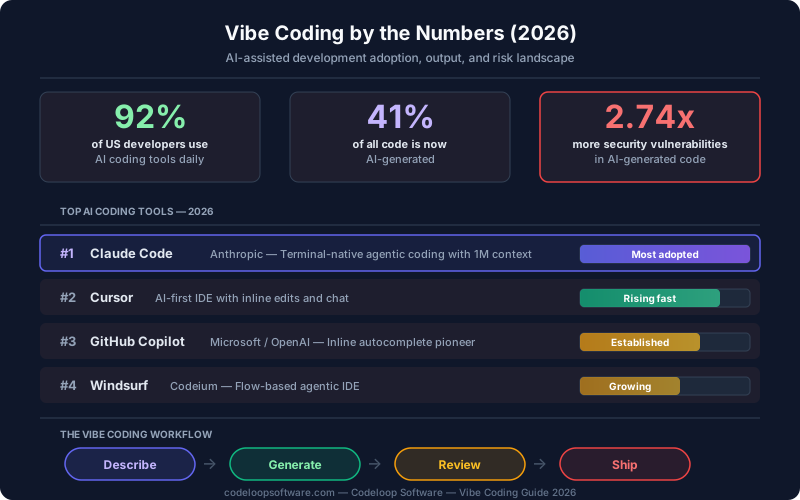
Vibe coding adoption, tools, and risk stats at a glance (2026)
Top Vibe Coding Tools in 2026
Not all AI coding tools are created equal. The market has consolidated around a few clear leaders, each with different strengths. Here's where things stand right now.
| Tool | Type | Best For | Context |
|---|---|---|---|
| Claude Code | Terminal agent | Full-stack agentic coding, large repos | 1M tokens |
| Cursor | IDE (VS Code fork) | Inline edits, fast iteration | ~50K tokens |
| GitHub Copilot | IDE extension | Autocomplete, broad language support | ~8K tokens |
| Windsurf | IDE | Multi-file edits, RAG-based context | ~200K tokens |
The biggest story here is Claude Code. It went from zero to the most-used AI coding tool in about eight months. The reason isn't mysterious: it operates as a true agent. It reads files, runs commands, writes code, executes tests, and fixes its own mistakes — all inside your terminal. Other tools assist. Claude Code acts.
We've seen teams pair Claude Code with Cursor — using Claude Code for heavy multi-file work and agent teams for parallel tasks, then switching to Cursor for quick inline tweaks. There's no rule that says you pick one tool. Most productive developers use two or three.
The Security Problem Nobody Talks About
Here's where the conversation gets uncomfortable. And honestly, it needs to.
Research shows that AI-generated code contains 2.74x more security vulnerabilities than human-written code. That's not a rounding error. That's almost triple the attack surface.
The real risk
The danger isn't that AI writes obviously broken code. The danger is that it writes code that looks correct. It compiles. It passes basic tests. But it has subtle vulnerabilities — SQL injection paths, improper input sanitization, hardcoded secrets, insecure defaults — that a quick review won't catch. When 41% of your codebase is AI-generated, that's a lot of surface area for subtle bugs.
Why does this happen? A few reasons:
- Training data includes insecure patterns. AI models learn from public repositories, and a huge percentage of open-source code has known vulnerabilities. The model reproduces what it's seen.
- Speed breeds complacency. When code appears instantly, developers review it less carefully. I've caught myself doing this — accepting a function that "looks right" without tracing the logic. That's the trap.
- AI doesn't understand your threat model. It doesn't know that your application handles medical records, or that your API is public-facing. It generates "generally fine" code, not "secure for your specific context" code.
This doesn't mean you should stop vibe coding. It means you need to pair it with real security practices. More on that next.
Vibe Coding Best Practices for Teams
After working with dozens of teams adopting vibe coding workflows, here's what separates the ones that ship fast and stay secure from the ones that accumulate tech debt at record speed.
- Always review the diff, not just the output. Don't just run the code and see if it works. Read the actual changes. AI-generated code can introduce dependencies, modify files you didn't ask about, or change behavior in adjacent functions.
- Run SAST tools on every PR. Static Application Security Testing catches the vulnerabilities that visual review misses. Tools like Semgrep, Snyk, and CodeQL should be non-negotiable in your CI pipeline when AI is writing code.
-
Give the AI context about your constraints. Tell it about your security requirements, your coding standards, and your architecture patterns. A well-written
CLAUDE.mdfile is worth its weight in gold — it steers every piece of generated code. See our token optimization guide for how to keep it lean while staying effective. - Set up test-driven vibe coding. Write the test first (or have the AI write it and you approve it), then have the AI implement the code to pass those tests. This inverts the usual pattern and catches a surprising number of issues before they land.
-
Use plan mode before complex changes. In Claude Code, hit
Shift+Tabto enter plan mode. Let the AI propose an approach before it writes anything. Review the plan. Then execute. This prevents expensive rework and keeps the AI aligned with your architecture. - Establish team conventions for AI usage. Document which tasks are appropriate for vibe coding and which require manual implementation. Not everything should be vibed.
The best teams we've worked with treat AI-generated code exactly like code from a junior developer. It's probably fine. But you're going to review it carefully, run the tests, and check for the things a junior wouldn't think about. That mindset keeps you fast without getting sloppy.
When NOT to Use Vibe Coding
This is the section that most "AI coding" articles skip. But it matters.
Vibe coding is wrong for some situations. Not "less optimal." Wrong. Here's where you should write code by hand:
- Cryptographic implementations. Never vibe-code encryption, hashing, or key management. The margin for error is zero, and AI models routinely produce subtly broken crypto code. Use audited libraries and write the integration by hand.
- Compliance-critical systems. If you're working under HIPAA, SOC 2, PCI-DSS, or similar frameworks, you need to demonstrate that every line of code was reviewed and understood. "The AI wrote it and it passed tests" won't satisfy an auditor.
- Safety-critical systems. Avionics, medical devices, automotive control systems — anywhere a bug could hurt someone. These domains have formal verification requirements that are fundamentally incompatible with probabilistic code generation.
- Novel algorithms. If you're implementing something that doesn't exist in the training data — a custom consensus protocol, a new data structure, proprietary business logic — the AI has nothing to draw from. You'll spend more time fixing its guesses than writing it yourself.
And a nuanced take: even within projects where vibe coding is appropriate, some files deserve more manual attention than others. Your auth middleware? Review that line by line. A new CRUD endpoint that follows the same pattern as twenty others? Let the AI handle it.
The Bottom Line
Vibe coding isn't a fad. It's the new default. When 92% of developers use AI tools daily and 41% of production code is machine-generated, we've crossed the point of no return. The question isn't whether to adopt it. The question is how to adopt it well.
The developers who thrive with vibe coding are the ones who understand what the AI is doing — and more importantly, what it isn't. They review carefully. They test rigorously. They know when to vibe and when to type every character themselves.
The tools will keep getting better. Claude Code's 1M context window and agent teams are just the beginning. But better tools don't eliminate the need for good engineering judgment. They amplify it.
Our take
Vibe coding makes good developers faster. It doesn't make bad developers good. If you understand architecture, security, and testing, AI tools will multiply your output. If you don't, they'll multiply your mistakes. Invest in the fundamentals first, then vibe.
Need Help Building a Vibe Coding Workflow?
At Codeloop, we help teams adopt AI-assisted development the right way — with proper security guardrails, team conventions, and tool selection. Whether you're setting up Claude Code for your engineering team, building a vibe coding playbook, or figuring out how to maintain code quality as AI-generated output scales, we've been doing this since before it had a name.
Talk to Us About AI DevelopmentFrequently Asked Questions
What exactly is vibe coding? +
Vibe coding is a software development approach where you describe what you want in natural language and let an AI tool generate the code. You review, guide, and iterate on the output rather than writing every line manually. The term was coined by Andrej Karpathy in early 2025 and has since become the dominant way most developers work with code.
What are the best tools for vibe coding in 2026? +
The leading vibe coding tools in 2026 are Claude Code (terminal-based agent with 1M token context), Cursor (VS Code fork for inline edits), GitHub Copilot (broad autocomplete support), and Windsurf (multi-file edits with RAG-based context). Most productive developers use two or three tools together depending on the task.
Is vibe coding production-ready or just for prototyping? +
Vibe coding is absolutely production-ready when done correctly. 41% of all shipped code is now AI-generated. However, it requires proper guardrails: code review, SAST tools in your CI pipeline, test-driven workflows, and clear team conventions. The key is treating AI-generated code like code from a junior developer — review it carefully before merging.
Who should use vibe coding? +
Vibe coding benefits developers who already understand code fundamentals — architecture, security, and testing. It makes experienced developers faster by handling the typing while they make the decisions. It is not a replacement for learning to code, and beginners who skip the fundamentals will struggle to review and correct AI-generated output effectively.
What are the security risks of vibe coding? +
Research shows AI-generated code contains 2.74x more security vulnerabilities than human-written code. The biggest risks include subtle issues like SQL injection paths, improper input sanitization, and insecure defaults that look correct at first glance. Mitigate this by running SAST tools on every PR, reviewing diffs carefully, and never vibe-coding cryptographic implementations or compliance-critical systems.